
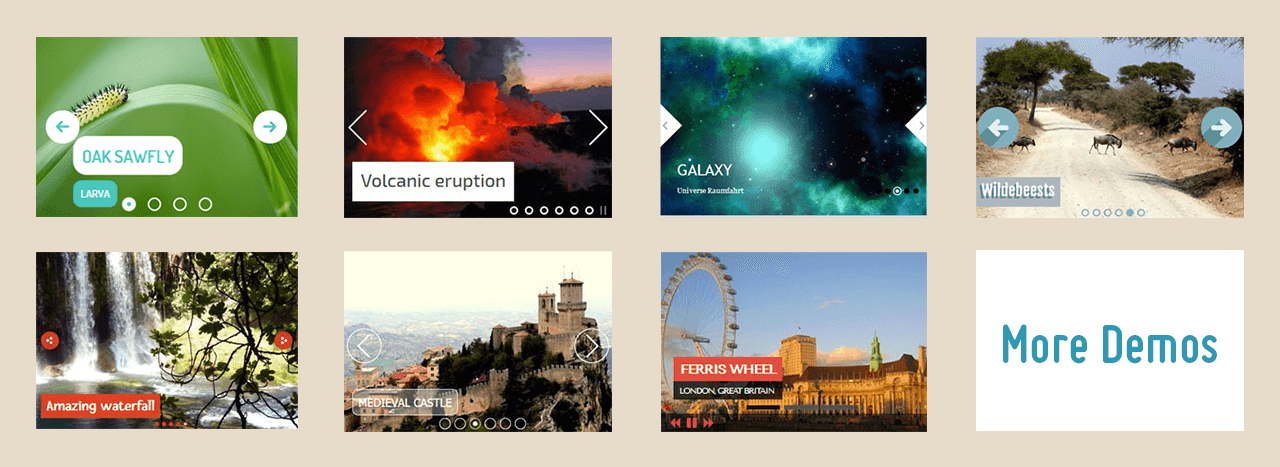
 Killer Effects
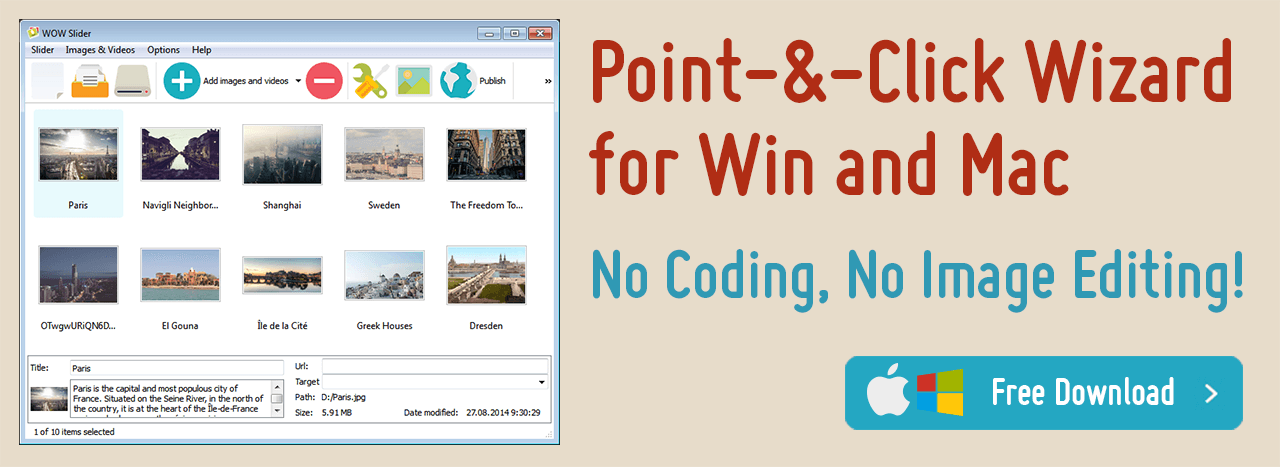 For Windows & Mac




Why WOW jQuery Slider?
 Compatibility with the widest feasible range of browsers, devices, and web standards
Due to the standards-compliant, valid, semantic markup and properly optimized script, jQuery Slider looks and performs perfectly on all mobile devices, current and legacy browsers.
Fast, lightweight, error-free
WOW jQuery Slider is light (6kb gzipped), loads fast, utilizes hardware-accelerated link in bio animations . It is successfully used and tested on millions pages (yes, millions), so we can say for sure that it's virtually bug-free.
Minimal efforts required to collect, design, and integrate into your online project
Save time by not having to code, learn yet another API, test, or photoshop. The drag-n-drop maker generates the slider automatically with the export as HTML page or Joomla/Wordpress plugin.And with visual Insert-to-Page Wizard you won't need to touch a single line of code to embed it in your page.
Recent Demos
-
 bootstrap carousel example
Bootstrap 5 Skin
with Shift Animation
bootstrap carousel example
Bootstrap 5 Skin
with Shift Animation
-
 slider html
Calm Design
with Ken Burns Transition
slider html
Calm Design
with Ken Burns Transition
-
 slick slider
Slick Design
with Bubble Effect
slick slider
Slick Design
with Bubble Effect

Simple to Use
The interface is easy and straightforward - just 3 steps:
1. Drop the images you want to add as slides.
2. Choose skin, effects, options.
3. Save slider as a stand-alone page, Wordpress plugin, Joomla module; embed in page with Insert-to-Page Wizard; publish to server via built-in FTP client.
The WOW Slider is designed for effortless navigation and user-friendly interaction, ensuring a smooth experience even for those with minimal technical expertise. Starting with an intuitive interface, users can create stunning slideshows in just three easy steps. Initially, users simply drag and drop their desired images into the slider. This is followed by a choice of skins, effects, and options, allowing for a personalized touch. The final step involves saving the slider, which offers versatile options such as standalone pages, WordPress plugins, Joomla modules, or embedding into web pages through an Insert-to-Page Wizard. Furthermore, it supports publishing directly to a server via an integrated FTP client, enhancing the ease of web integration and making the process of creating and deploying a slider exceptionally streamlined.

Highly Customizable
Every slideshow parameter can be easily customized to fit your web site design and your needs. Enjoy features like: navigation control (with thumbnails, prev/next and stop/play buttons, bullets, filmstrip), auto-play, loop, random order, text descriptions, hide/show controls or stop on mouseover, image and thumbnail size, crop mode, slide delay, transition speed, watermark and much more!
The customization options with WOW Slider are extensive, offering a wealth of features to tailor the slideshow to specific design needs and preferences. Users have control over various elements including navigation controls, which encompass thumbnails, prev/next buttons, auto-play features, loop settings, and much more. The slider's adaptability extends to text descriptions, control visibility, image sizing, and cropping modes. This level of customization ensures that every slideshow can be uniquely tailored, from the speed of transitions to the inclusion of watermarks, making each presentation a true reflection of the user’s style and the website's branding.

Lightweight and fast
Most jquery sliders put all supported features in one bloated script. WOW jQuery carousel generates the engine script depending on setting you chose, so the final code is compact and has the required functionality only. For example the slider created with default settings is only 6Kb!
In an era where online video platforms like TikTok and YouTube reign supreme, WOW Slider's capability to integrate video slides is invaluable. This feature allows you to infuse your slideshows with dynamic content from popular video services, adding a new dimension to your presentations. Incorporating videos alongside traditional images creates a multimedia experience that captures and holds audience attention. This functionality is vital for staying relevant in a digital landscape dominated by video content, offering a versatile tool for creative expression.

Touch/swipe navigation
With the growing trend of mobiles it is important that your website be accessible on all devices. WOW HTML slideshow supports touch screen
gestures to ensure that your visitors receive a smooth, native-like experience.
Unlike many jQuery sliders that burden websites with heavy scripts, WOW Slider stands out for its lightweight and efficient code. It generates a streamlined engine script that is specifically tailored to the selected settings, ensuring that only necessary functionalities are included. This approach results in a compact final code, optimizing website performance and loading speed. For instance, a slider created with default settings is remarkably light, often only 6Kb in size. This efficiency is crucial for maintaining fast page load times, a key factor in user experience and SEO performance.

Responsive Design
WOW Responsive Slider is brilliantly responsive with any template, effect, options you choose. No matter what device people access your site from, the slider will look consistently perfect.
In the era of diverse screen sizes and platforms, the responsive design of the WOW Slider guarantees a consistent and optimal viewing experience across all devices. This responsiveness is seamlessly integrated, regardless of the chosen template, effect, or option, ensuring that the slider always maintains its visual appeal and functionality. This adaptability is crucial for modern websites, where users may access content from a variety of devices, from desktop computers to smartphones.

Live Preview
Manage all parameters of your slider using a live preview area. See exactly how it will look before you publish. Enjoy easy and fun customization "on-the-fly"
The live preview feature of WOW Slider offers a dynamic and interactive way to manage and adjust slider parameters. Users can immediately see the impact of their changes in a real-time preview area, providing a transparent and immediate understanding of how the slider will appear on their website. This feature allows for a more intuitive design process, as adjustments can be made on the fly, ensuring that the final product aligns perfectly with the user’s vision.

Visual Insert-to-Page
Not a coding guru? Don't know what is an HTML slider code? Just run Insert-to-Page Wizard, open a page, and click a place where you want the slideshow to appear. WOW javascript slider takes care of the rest. Truly NO coding experience!
For those who are not well-versed in coding, WOW Slider offers a Visual Insert-to-Page wizard, eliminating the need for in-depth technical knowledge. Users can effortlessly integrate the slider into their webpage by simply selecting the desired location in the wizard. The tool automatically handles the coding and integration, making the process accessible even to those with no coding experience, and ensuring that the slider can be seamlessly added to any website.

All Browsers
jQuery Slider works flawlessly on all browsers, including Internet Explorer 6+, Firefox, Opera, Safari, and Chrome on PC, Mac, iOS, and Android. Its HTML code is well-structured and usable by all search engine crawlers and text browsers.
The cross-browser compatibility of WOW Slider ensures a flawless performance across a wide range of web browsers. This includes older versions like Internet Explorer 6, as well as modern browsers such as Firefox, Opera, Safari, and Chrome. It's also fully functional on various operating systems, including PC, Mac, iOS, and Android. This wide compatibility is crucial for reaching a broad audience, as it ensures that the slider functions properly for every user, regardless of their choice of browser or device.

Hate jQuery?
It's not a good idea to include the hefty library simply to slide images if you don't use jQuery at all in your project. Ok. Remove all.js and Javascript calls from a website, and the WOW Slider will still function as a pure CSS slider! This pure CSS fallback also works great when Javascript is not supported or has been disabled.
Understanding that not all projects require the extensive features of jQuery, WOW Slider offers a pure CSS fallback for scenarios where jQuery is not utilized. This fallback ensures that the slider continues to function efficiently as a CSS-only slider, even when JavaScript is not supported or is disabled in the user's browser. This feature is particularly useful for projects aiming for simplicity and speed, or in situations where JavaScript usage is limited.

Spectacular Theme Set
You are not limited to a single look while using a theme collection. Your sliders will seem more professional right away if you use pre-designed themes. Each template's controls, fonts, colors, frames, and backgrounds are all flawlessly synchronized. Simply drag and drop pics or images and fill in the details with your own text.
WOW Slider provides a diverse collection of pre-designed themes, each meticulously crafted to enhance the professional appearance of your sliders. These themes are perfectly harmonized in terms of controls, fonts, colors, frames, and backgrounds, allowing for a polished and cohesive look. Users can simply drag and drop images and customize the text to create a slider that not only looks professional but also aligns seamlessly with their website’s design.

Impressive Animations
Use over 25 eye-catching transitions and effects for photos and text that will leave a lasting impression on your visitors. Maintain the center of your clients' attention on your website.
WOW Slider provides a diverse suite of over 25 stunning animation patterns, custom-designed to enhance the visual appeal of photos and accompanying text. Each transition has been meticulously crafted to seize and sustain viewer engagement, drawing them into an immersive experience tailored to leave a memorable impact. This premium selection of effects serves as a dynamic focal point, ensuring the audience remains thoroughly absorbed by your site's content.

Joomla and Wordpress plugin
jQuery Image Slider comes with Joomla and Wordpress slider plugin export so publishing your slideshow to your Wordpress or Joomla site was never as easy as this.
The WOW Slider ensures effortless integration with popular content management systems. The package includes ready-to-deploy plugins designed specifically for Joomla and WordPress platforms, streamlining the process of embedding responsive sliders into websites. The intuitive export options available within this jQuery Image Slider make it a breeze for users to quickly publish vibrant slideshows without tangling with complex coding, easing the transition between development and live presentation on CMS-driven websites.

Full width slider
Unlike the boxed style, the full width option enables you to let your slider stretch the whole width of the browser, making your photos stand out.
The full-width feature of WOW Slider breaks free from the confines of boxed layouts, granting your images the liberty to span across the entire browser interface. This option is skillfully engineered to adapt seamlessly to varying screen sizes, assuring that your visual content consistently delivers maximum impact. As a result, viewers encounter an arresting spectacle — images that gracefully extend edge-to-edge for a bold visual statement that distinguishes your slider content from conventional presentations.

Video Slides
Cable television has been overtaken by online video, such as TikTok and YouTube. WOW image carousel can work YouTube and Vimeo that allow you to liven up your slides by supplementing the regular images.
The escalating popularity of online video channels redefines contemporary media consumption habits. Recognizing this trend, WOW Slider incorporates seamless compatibility with leading video platforms such as YouTube and Vimeo. This compatibility permits the inclusion of engaging video content alongside traditional imagery within your slides. The multimedia carousel enriches user experience by offering a dynamic blend of static and motion elements, diversifying the storytelling potential within each slide show.

On-Demand Loading
Assume you have a 128-picture slideshow. If you use simple HTML code for all of your images, the website will load and run much slower. For this case jQuery Image Slider has the "On-Demand Loading" option also known as "lazy loading" that loads only images that enter or are about to enter the viewport. For extensive image galleries — consider the challenge presented by a slideshow containing 128 pictures — WOW Slider introduces an intelligent solution in 'On-Demand Loading.' Tailored for optimization, this feature initiates loading of images only as they approach visibility within the viewer's browser window. Dubbed 'lazy loading,' this approach significantly trims initial page load times and enhances overall performance by reducing unnecessary data transfer. Consequently, users enjoy swift access to content without bogging down their browsing experience under the weight of preloading an entire gallery's worth of assets.

38-language interface
No matter what language you speak at home, the jQuery Slideshow app interface has already been translated into 38 languages, ranging from African to Vietnamese! This allows people who don't speak English well enough to start generating html slideshows fast and easily.
The jQuery Slideshow app embraces global diversity by offering an interface that supports 38 distinct languages. This spectrum encompasses languages as diverse as African dialects to Vietnamese, catering to a global audience. The multilingual interface ensures that language barriers are dismantled, empowering users from various linguistic backgrounds to create html slideshows with ease and efficiency. The inclusivity of language support extends the app's reach, making it accessible for non-English speakers to engage with technology without the linguistic hurdles that often impede software usability.

Import from Instagram, Tiktok
You can easily add photos from Instagram, Tiktok, Pinterst to jQuery slider. Just paste the URL of photostream, photoset, album or single photo and define the number of imported images!
Embrace the era of social media by seamlessly integrating images from some of today's most popular platforms: Instagram and Tiktok. The jQuery slider simplifies the process by allowing users to directly import visual content through just a URL link. Whether it's a vast photostream, an entire photoset, a curated album, or a single stunning snapshot, users can effortlessly define the number of images they wish to incorporate into their slider. This feature taps into the rich reservoirs of personal and creative expression found on these social mediums, giving your slideshow a vibrant and contemporary edge.

Mac and Windows
You can set up and use jQuery Slider on both Windows and Mac OS and utilize the same interface, features, and project file if you operate cross-platform on any desktop.
Designed with versatility in mind, the jQuery Slider offers flawless functionality across both Windows and Mac OS environments. This cross-platform compatibility ensures that users benefit from a consistent experience, whether they're working from a PC or Mac. The adaptability extends to preserving project files across both operating systems, providing a seamless transition for those who operate within varied tech ecosystems. This harmonious integration underscores the app's commitment to accommodating diverse technological preferences while maintaining high performance standards.

Publish to Instagram
Sharing your content on Instagram is getting more and more popular. Right from the toolbar, click Share and the slider is there. Turn your slideshow into a worldwide event.
Capitalizing on Instagram's soaring popularity for content sharing, this feature allows you to bring your creations directly into the limelight. With simple navigation through the toolbar followed by a click on Share, your crafted slider is ready for its Instagram debut. Transcend geographical boundaries as you convert your slideshow into an engaging spectacle for audiences worldwide. Attract attention, garner followers, or simply share moments—this feature is your gateway to global connectivity.

FTP client
Built-in FTP client lets you instantly and securely send your jQuery slideshow files directly to your server, without having to use the separate FTP software.
The in-built FTP client streamlines the process of transferring your painstakingly crafted jQuery slideshow directly onto your server with heightened security and efficiency—and all of this without the need for separate FTP software. This thoughtful integration simplifies workflows by minimizing the steps required for web publishing. Users can enjoy peace of mind knowing that their files are transferred securely while also saving precious time during web development processes. This direct pipeline assures that your creative works are swiftly deployed and ready for audience enjoyment with minimal hassle.

SEO Friendly
The slider is made of simple HTML5, which makes it easier for search engines to scan the site while still appearing great. This allows you to delight not just Google's search engines, but also your consumers.
In the realm of digital content, visibility is key. WOW Slider is designed with HTML5, a language that balances aesthetics with functionality. This design choice ensures that search engines can effectively index the site, enhancing its visibility. The slider's compatibility with search engine algorithms doesn't compromise its visual appeal, offering a dual benefit. It caters to the technical requirements of search engines like Google, while also maintaining a visually appealing interface for the end-users. This feature is crucial for anyone aiming to strike a balance between attracting search engine attention and providing a delightful user experience.

Automatic Sizing and Cropping
Images come in a variety of sizes, resolutions, and orientations. WOW Slider eliminates the need for several photo editors to prepare your images for the slider. jQuery Slider generates properly proportional slide pictures based on your size/crop preferences.
WOW Slider simplifies the complex task of photo preparation for slideshows. Dealing with various image dimensions, resolutions, and orientations can be daunting. This tool addresses these challenges by offering an integrated solution, removing the need for multiple photo editing programs. Users can specify their preferences for size and cropping, and WOW Slider adeptly adjusts each image to fit seamlessly into the slide format. This feature ensures that all images, regardless of their original state, are displayed in a visually appealing and consistent manner. The technology behind this function intelligently analyzes each photo, ensuring that key elements are not lost during the cropping process. It's an efficient, user-friendly approach to image preparation, tailored to create a cohesive and professional-looking slideshow.

Background Music
Often, images and text alone are insufficient to captivate and catch your audience's attention.
By incorporating an audio soundtrack, you can easily add energy and drama to your slider.
Sight alone seldom grasps the entirety of an audience's focus in the digital milieu. Introducing an auditory element into the visual presentation enriches the sensory experience. With the inclusion of background music, a standard image slider transforms into a dynamic narrative tool. Picture this: photographs unfolding in sync with rhythmic beats or a heartwarming melody that ties the visual journey together. To infuse your slider with this emotional depth, simply overlay it with a fitting soundtrack. The result? A synchronized audio-visual flow capable of invoking stronger reactions and more lasting impressions.

Free Download
jQuery Slider is available for non-commercial or evaluation use. If you wish to use the WOW Slider on a university website, a non-commercial blog, or just to check if it matches your requirements, you may download and use the fully working free version.
The realm of digital creativity thrives on accessibility and experimentation. WOW Slider embodies this spirit by offering its jQuery Slider at no cost for individuals exploring its capabilities or deploying it within non-profit contexts. Scholars eager to enhance academic websites, bloggers animating non-commercial digital narratives, or any curious user assessing compatibility needs can take full advantage of the complete version without financial obligations. This complimentary accessibility allows thought leaders, creatives, and innovators to experience the full suite of features and assess their suitability for ongoing projects—thereby crafting informed decisions about the potential integration into their respective digital environments.
jQuery Slider Features
Wizard Features
Support
For troubleshooting, feature requests, and general help, contact Customer Support at
 .
Make sure to include details on your browser, operating system, WOW jQuery Slideshow version, link to your page. In most cases you'll get a reply within 1 business day.
Please check our FAQ and Tutorials
first to see if your question has already been answered.
.
Make sure to include details on your browser, operating system, WOW jQuery Slideshow version, link to your page. In most cases you'll get a reply within 1 business day.
Please check our FAQ and Tutorials
first to see if your question has already been answered.
Blog
 Overview
WOW jQuery Slideshow not only makes stunning-looking sliders, but also ones that are fast, accessible, and packed with the newest features and capabilities. WOW javascript carousel allows you with the simple click of the mouse to make an endless amount of adjustments to your jquery slider. Touch/swipe support in a responsive slider? Do you want a full-width slider with a thumbnail filmstrip and play/pause buttons? Text descriptions and 3D effects? It's no issue! Even better, jQuery Slideshow comes with 50+ entirely original themes, 32 transitions, and hundreds of live examples to show you what you can do with it.
 DOWNLOAD
WOWSlider is free for non-commercial use. If you want to use WOW Slider on a school site,
your non-commercial blog or non-profit organization website, just download WOW Slider and use it for free.
A license fee is required for commercial use. For more info about commercial licenses , please click here.

 Download Free Version
  What's new
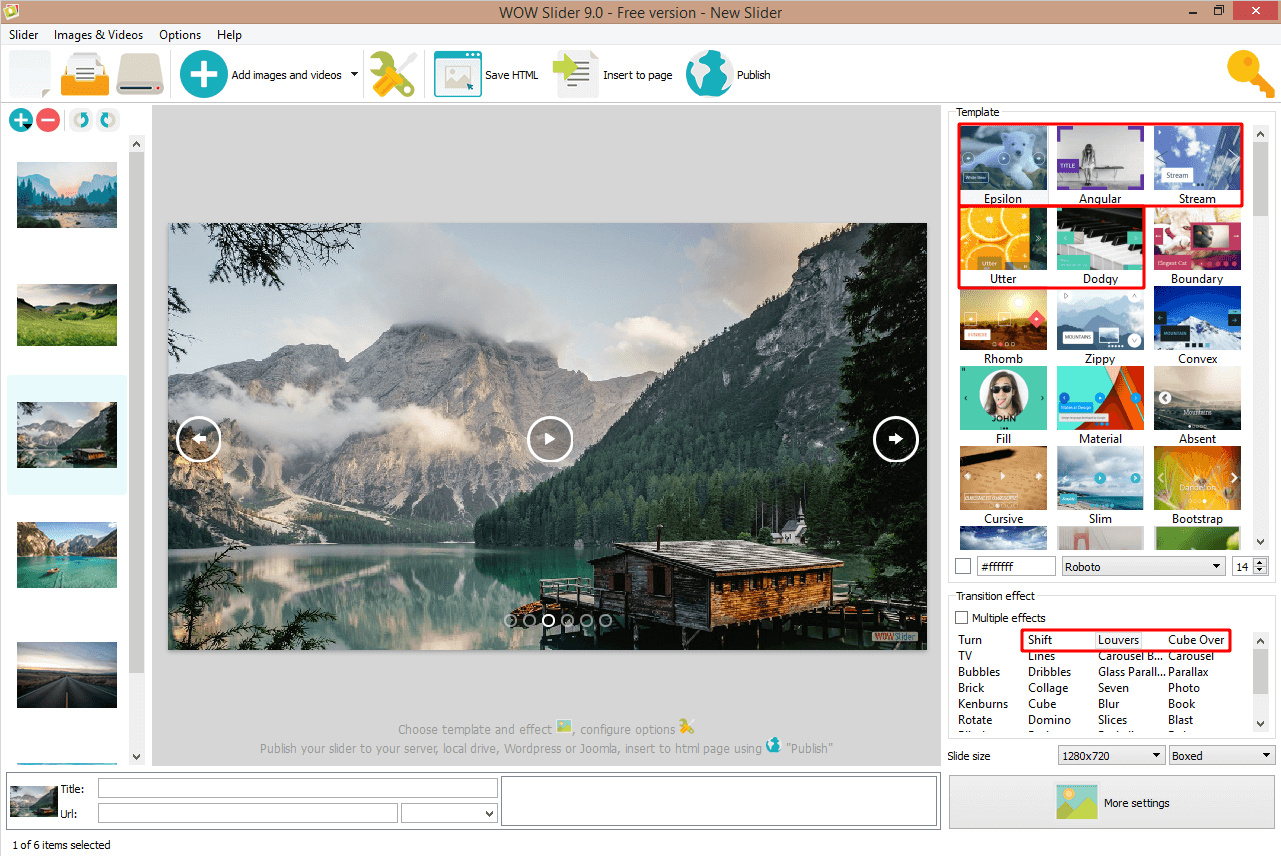
Feb 3, 2022 jQuery Image Slider v9.0
* New styles: Angular, Epsilon, Stream, Utter, Dodgy
* Effects: Shift, Louvers, Cube Over, TV
* Added new hi-res slide sizes: 4K, FullHD, 1600x900 etc..
* Improved image quality
* Retina screens support
* GUI translation for Italian, Japanese, Portuguese, Russian, Spanish, Swedish languages
* Minor fixes
Dec 14, 2021 jQuery Image Slider v8.8
* New template: Bootstrap Carousel
* Fixed bugs with adding slides from Youtube and Instagram
* Minor fixes
Aug 23, 2021 jQuery Image Slider v8.6
* New effect: Slick slider
* Wordpress plugin is updated for latest version
May 12, 2021 WOWSlider v8.4
* GUI translation for Chinese, Dutch, French, German languages
WOWSlider v8.2
* Now you can add targets "_parent" and "_top" to your links
* Added TikTok
* Fixed import from Youtube
WOWSlider v8.0
* Now you can publish your sliders to free website maker and Google Drive
WOWSlider v7.8
* New designs: Boundary , Slick carousel
* New fonts: Lora, Indie Flower
* PNG images with "Image fill color" bug fixed
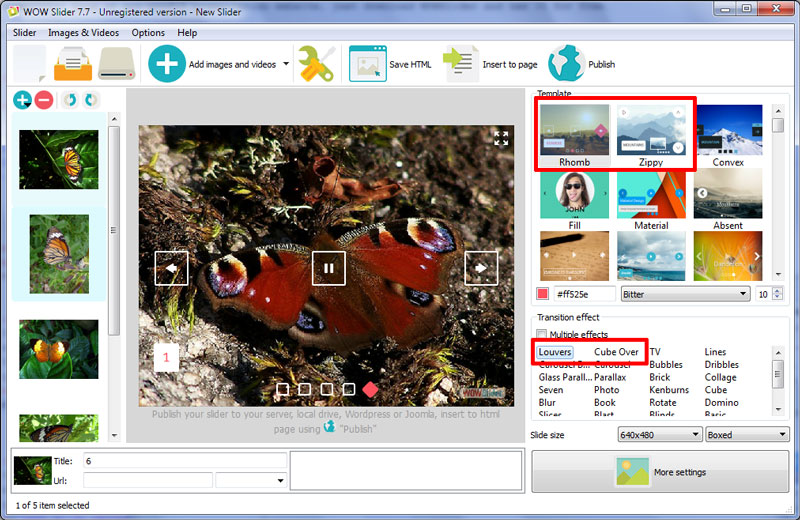
jQuery Image Slideshow v7.7
* Zippy skin
* New fonts: Bitter, Khula
* jQuery updated to 1.11.2
* Fixed some problems with playing audio
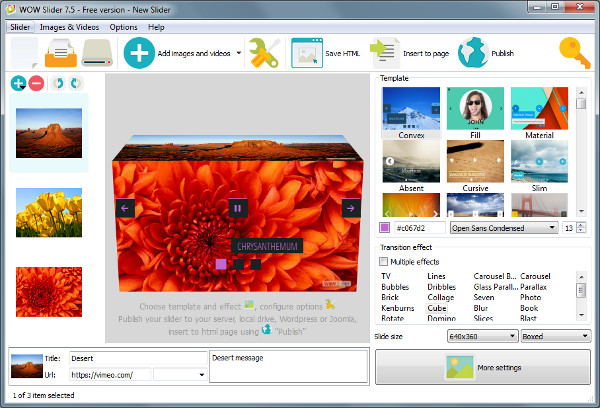
jQuery Slideshow v7.5
* Convex, Fill templates
* Effect: Lines
* New color and font size option for the description
* Fixed problem with adding sound files
jQuery Slideshow v7.4
* New templates: Absent, Material
* New effects: Bootstrap Slider, Bootstrap Carousel
* New custom font option for the description
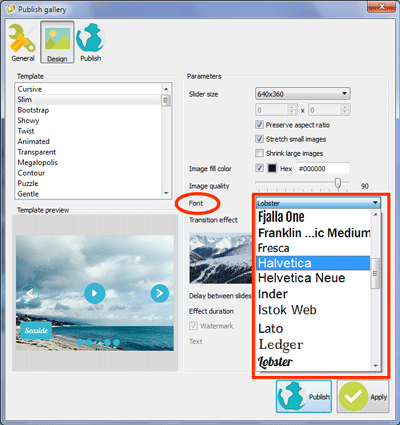
jQuery Slideshow v7.3
* New beautiful templates: Cursive, Slim, Bootstrap 4 Carousel, Showy
* Improved 'Insert to page' wizard with new interface
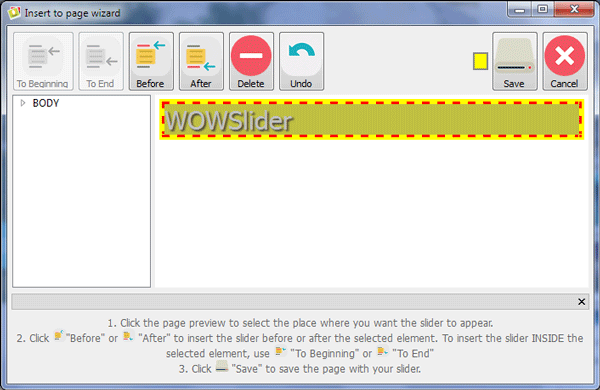
* Now you can set the description effect to 'none'
jQuery Slideshow v6.7
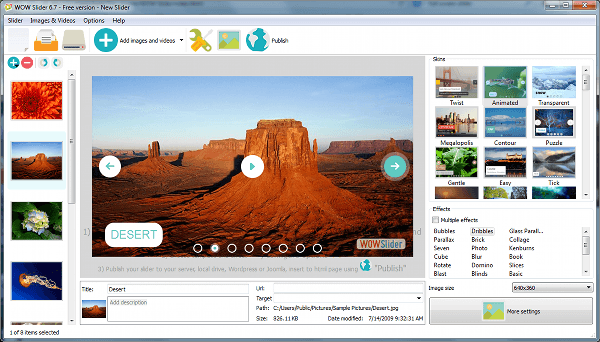
* Brand-new GUI - New right templates/effects panel and Live Preview window. See exactly how the slider will look "on-fly"
jQuery Slideshow v6.6
* New fantastic Glass Parallax, Bubbles, Dribbles effects and Twist skin
* New Traces animation for descriptions
* Now you can select several transitions for one slider and they will play randomly
* Improved Seven, Photo, Kenburns, Squares effects - now much smoother
jQuery Slideshow v6.2
* Full-Width, Full-Screen layout
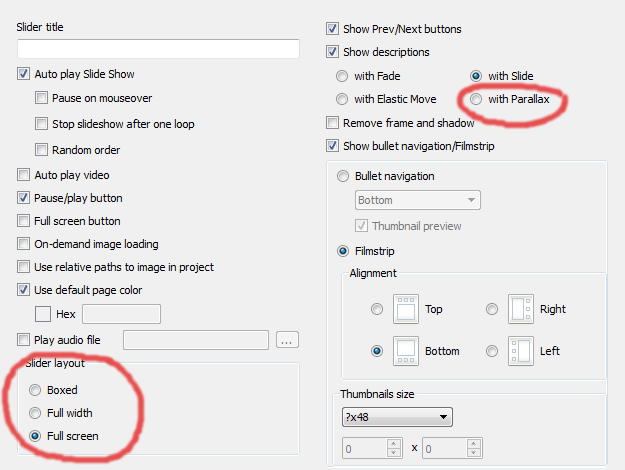
* New Parallax effect for slides and descriptions
* New "Animated" template
jQuery Slideshow v6.1
* YouTube and Vimeo video
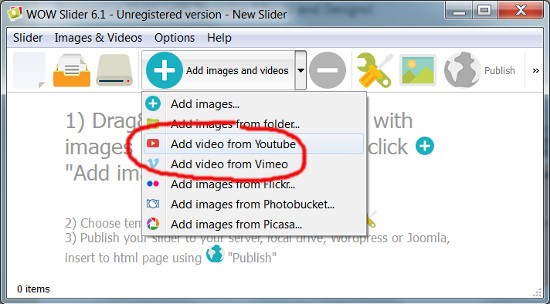
* App interface face-lift - more flat and convenient
* Fixed import from Photobucket
jQuery Slideshow v5.6
* New 3D effect: Brick
* New skin: Transparent
* Improved touch-swipe for native-like mobile experience
* Most of effects are rewritten to use the hardware-accelerated animations
* Wordpress plugin updated
* Some errors fixed
jQuery Slider v5.5
* New skins: Megalopolis jQuery image slider, Puzzle and Contour
* Fixed problems with adding images from Flickr
jQuery Slider v5.4
* New skins: Gentle, Easy and Tick
* Music on mobile devices. Just slide image to start the playing.
jQuery Slider v5.3
* New effects: Photo and Collage
* New skin: Grafito
* Improved the transition performance on mobile devices
jQuery Slideshow v5.0
* New themes: Emerald, Glass and Turquoise
* Responsive feature improved: descriptions, navigation arrows and filmstrips adapt to the viewing environment.
jQuery Slideshow v4.9
* Simple, Shuffle and Zoom sliders
* Cube transition effect is compatible with Internet Explorer 10 (and higher) now
* Improved Book transition effect. Now it works with IE 9+
jQuery Slideshow v4.8
* Sky, Salient and Dot templates
* New transition effect: Seven
* Support for .png image files with preserving transparency. To preserve image transparency, you should disable "Image fill color" option at the Gallery->Properties->Images tab.
* Wordpress plugin update: RTL mode and multi-sites mode; improved compatibility of new transition effects.
jQuery Slideshow v4.7
* Pure, Box and Book
* New transition effect: Book
jQuery Slideshow v4.5
* New template: Fresh
* New transition effect: Cube
jQuery Image Slideshow v4.4
* Ionosphere, Luxury and Sunny slideshow examples
* Updated transition effect: Page
jQuery Image Slideshow v4.2
* New demos: Premium, Gothic, Chess
* New transition effects: Page and Domino
* Pause/Play option.
jQuery Image Slideshow v4.0
* New flat skins: Premium, Gothic, Chess
* Improved templates: Metro, Balance.
jQuery Image Slider v3.9
* New demos: Metro, Geometric, and Elegant
* Improved templates: Plastic, Cloud and Calm.
v3.7
* New layouts: Surface and Vernisage
v3.4
* Plastic and Flat demos
* Now you can export your slider jquery as a joomla 2.5 module
v3.3
* Studio and Push styles css slider
* Background music for slideshow (mp3 file)
* Updated Wordpress plugin
* Improved support for old IE (IE6,7,8)
* Minor GUI changes
WOWSlider v3.0
* Balance, Cloud, Drive, Subway
* New jQuery 1.9
* In a single line, write the iframe embed code. When you "publish to folder," the app also creates an iframe index.html file with the Single-line iframe code that you can use to embed in your page. This method may be used to make slider insertion simpler or to prevent CSS/JS conflicts. With a high number of thumbnails, the scroll speed of the filmstrip is slowed. Image files in the.png format are supported. For a description, use a fade effect. The option "Image fill color" has been introduced. You may now change the color of the empty spaces surrounding the photos. Fixes for bugs
v2.8
* New templates: Silence, Dominion, Calm
* Updated export to Wordpress html slideshow
* Compatibility of "Filmstrip" with iOS and Android was improved
v2.7
* Updated WP plugin
* Minor fixes
v2.6
* New: Prime Time, Dark Matter, Catalyst jQuery Banner Rotator, jQuery Picture Slider
* "Random order" option to play slides randomly
* "Filmstrip" image scroller option for thumbnails with touch swipe support
* "Thumbnail size" option
* "Change Effect" buttons with every online slider demo - Test available effects
* Chinese translation for site
* Bug fixes
v2.5
* New Quiet template
* New Rotate effect - see Javascript Slideshow demo
* New Elastic Move effect for description
v2.4
* Bug fix version
* Updated guide and video How to Insert WOW Slider in Wordpress
v2.3
* WOW Slider is fully responsive now, see responsive slider demo
* New Elemental, Shady, Numeric template
* Fixed conflict with previously installed sliders in Wordpress
v2.1
* Fully accessible as a 100% CSS Slideshow, if the Javascript is turned off
* Improved import to Wordpress
* New Aqua template
* New Flip effect
* "Delay between slides" and "Effect duration" maximum increased to 60 sec
* "Use relative paths to image in project" option
* "On-demand image loading" option - good for slow servers or large number of images (see huge jQuery Slideshow demo with 100+ slides)
* The ability to customize the page's color; Parameter that specifies whether to begin with a predefined picture or a random image; The parameter specifies whether the slideshow should be performed in a predefined or random order. The panel for image adjustments is always displayed; On Mac, an issue with "Preserve aspect ratio" has been fixed;
* Updated translations: Bulgarian, Finnish, Gujarati, Indonesian, Montenegrin, Arabic, Catalan, Chinese, Czech, Danish, Hungarian, Romanian, Serbian, Slovenian, Ukraine
v2.0
* New Blur effect - see bootstrap slider demo
* New Terse template
* "Remove frame and shadow" option
* Sinhalese interface translations
v1.9
* Improved Ken Burns slider effect - now much smoother
* Option to disable a right-click on slides
* Japanese and Hebrew interface translations
* Now you can add more than one slideshow to Joomla
* Improved swipe touch events for iOs / Android
* "stopOn" parameter - defines the number of slide to stop on.
* List for target parameter added
v1.7
* New Stack, Stack Vertical, Basic Linear effects - check jQuery Carousel, HTML5 Slider, CSS Slideshow demos
* New themes - Digit and Mac
* Now you can stop slider after one loop
* Now you can specify target for images links in WOW Slider app
* Swipe touch slider events for iPhone / iPad / Android
v1.5
* New Ken Burns transition effect - Ken Burns Slideshow demo
* Now you can control position of navigation bullets one the page
* Now you can pause slider on mouseover
* Improvements in 'Insert to Page' wizard: now you can specify unique ID for the each slider and add several sliders to one page
v1.3
* Now you can create thumbnail preview for bullet navigation
* Also you can export Joomla slideshow module.
* Picassa support. Add Picassa album or a single photo to your slider gallery.
* Description for Photobucket and Flickr
v1.1
* New Slices, Fly and crazy Blast effects - jQuery CSS Slider, Photo Slider and Online Photo Slideshow demos
* New templates - Flux, Pinboard and Mellow